Built for self-hosted music

Subsonic Player
A pro-grade player for desktop and mobile

Connect your own music server (Subsonic / Navidrome / Gonic / Jellyfin / Emby / Plex / Synology AudioStation) and enjoy a Roon-style browsing experience, a 10-band EQ, karaoke-scrolling lyrics and gapless playback. Desktop and native Android apps, free and open source.

Windows 10/11 x64 · unzip and run (Chromium bundled, no runtime to install) | Android 10+ · direct APK install | MIT licensed

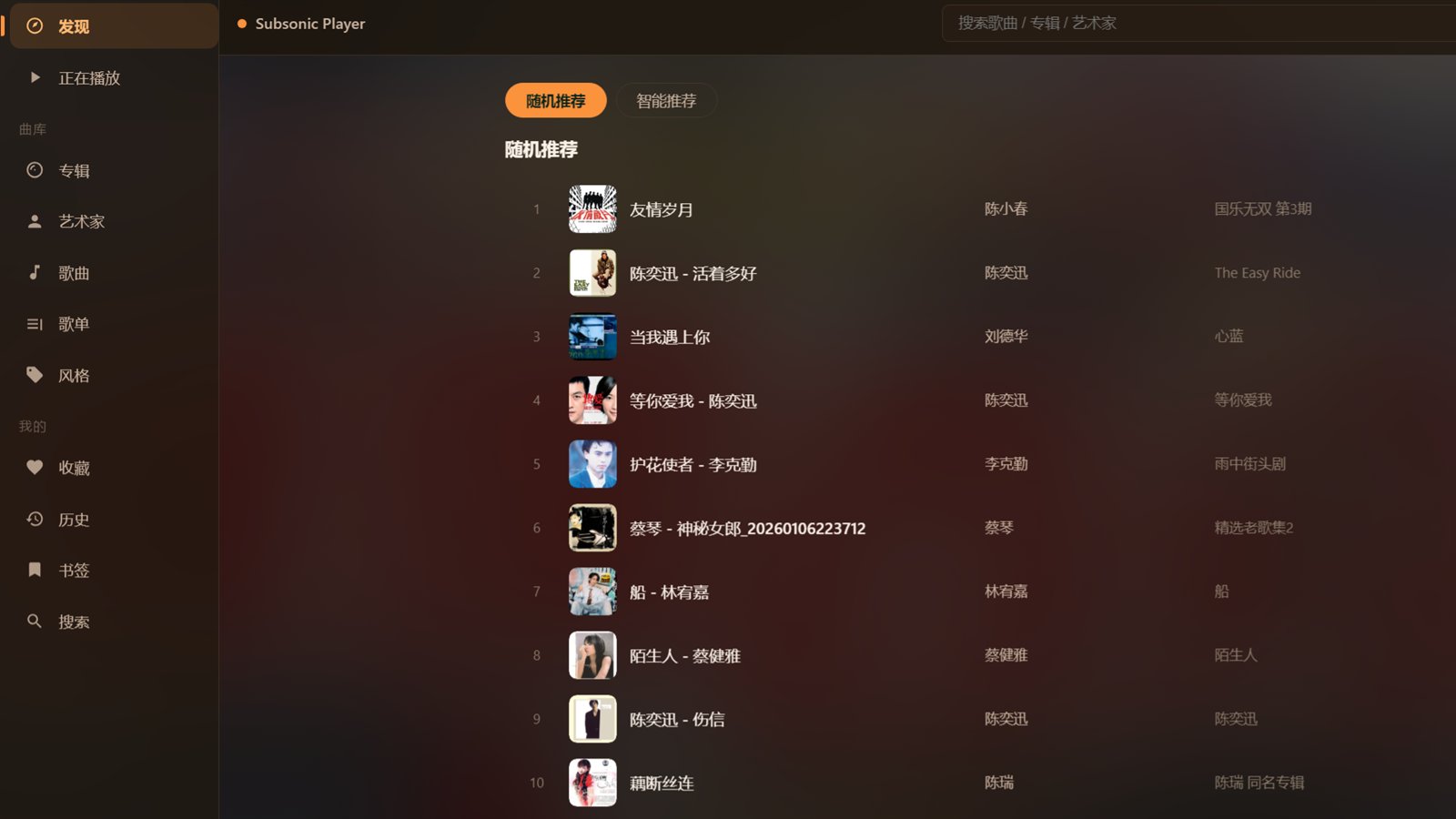
Subsonic Player on Windows: left navigation (Discover, Now Playing, Albums, Artists, Songs, Playlists, Genres, Favorites, History, Bookmarks, Search) and a random recommendations list

Features

Full-featured on desktop, reimagined for portrait phones — one library, two shapes.

Browsing & discovery

Artist / album / song browsing, cover wall and global search. The Discover page offers random picks and smart recommendations based on your favorites and genre affinity, plus recently added, most played, top rated, and browsing by genre or decade.

Playback & audio

HTTP streaming, queue management and four play modes. Gapless playback with 0–15s crossfade (BASS mixer), a 10-band graphic EQ with presets (rock / pop / classical / vocal / bass boost, import & export) plus reverb, echo, chorus and compressor DSP.

Karaoke lyrics

Synchronized server lyrics first, with a parallel fallback to LRCLIB and NetEase Cloud Music. The current line is highlighted and enlarged while neighbours fade — cached locally so lyrics appear instantly next time.

Multi-protocol

Native Subsonic / OpenSubsonic (Navidrome, Gonic, Jellyfin), plus Emby, Plex and Synology AudioStation. Configure several servers with LAN-first, WAN-fallback address handling.

Library management

Create, rename and edit playlists, add songs to playlists, favorites (heart), 1–5 star ratings, share links and original-file downloads. Play history with scrobbling and cloud-synced play queues.

Native Android app

A fully native client with background playback, notification and lock-screen controls, headset buttons and proper audio focus. Bottom navigation and a full-screen player rebuilt for portrait phones, with resume-where-you-left-off.

Themes

Six built-in themes (Deep Black, Moonlight White, Forest Green, Midnight Blue, Sunset Orange, Rose Purple) with selectable accent colours and instant light/dark switching.

Private by design

No accounts, no cloud library — all data stays on your own server. Credentials are encrypted at rest (Windows DPAPI / Android KeyStore) and never hard-coded or uploaded.
Screenshots

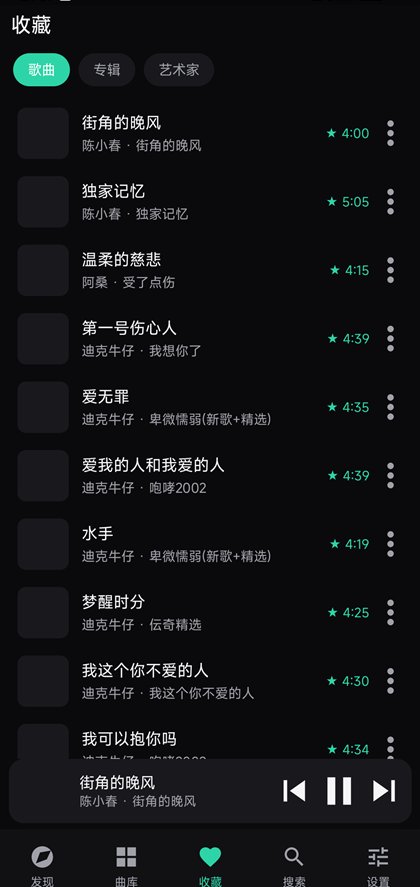
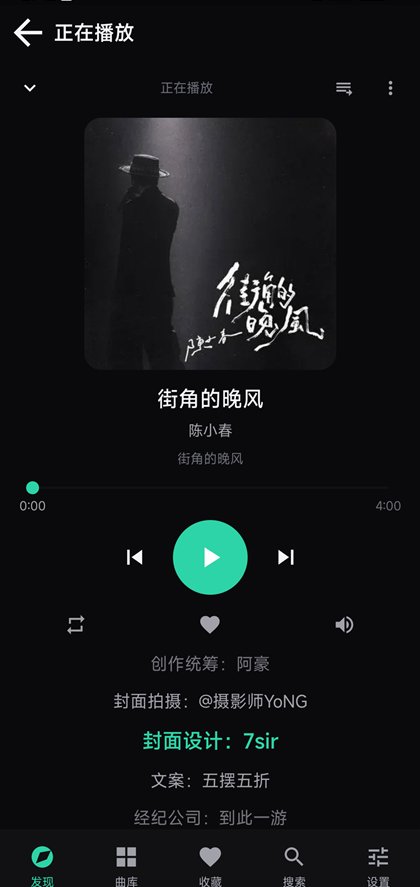
Top: the Windows desktop app. Below: the Android client (Discover, album wall, Now Playing and lyrics).

Windows desktop app: dark UI with left navigation and a random recommendations list
Windows desktop app · Roon-style HTML interface rendered by Chromium
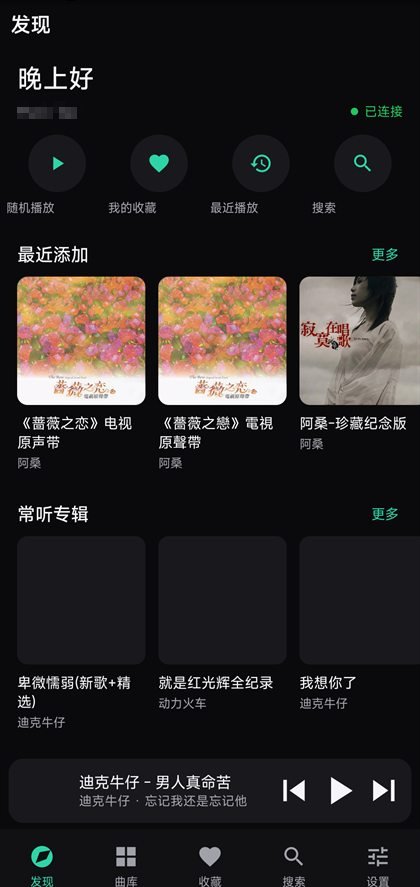
Android client Discover page with greeting, quick actions and horizontally scrolling album cards
Discover
Android client album grid with three columns of cover art and sort chips
Favorites
Android client Now Playing page with large cover art, seek bar and playback controls
Now Playing
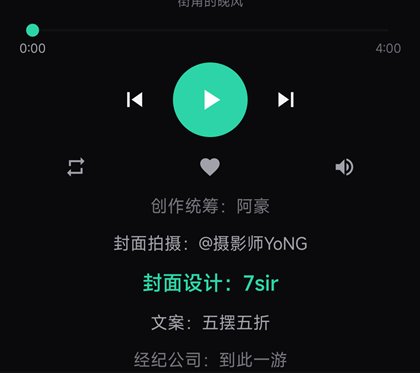
Android client karaoke-style scrolling lyrics with the current line highlighted
Karaoke lyrics

Download

Everything is free. The Windows build is a portable zip; the Android build is an APK (allow "install unknown apps" to install).

Windows desktop

v1.1.0 · x64 · self-contained

  • Windows 10 / 11 (64-bit)
  • Chromium UI and .NET runtime bundled — nothing else to install
  • Tray icon, mini player, taskbar media controls, global hotkeys
Download for Windows (~275 MB)

Unzip and run SubsonicPlayer.exe. On first launch, fill in your server address and account under Settings → Music Server.

Android app

v0.1.0 · minSdk 29 (Android 10+)

  • Background playback, notification and lock-screen controls, headset buttons and audio focus
  • Native UI: bottom navigation, mini player, full-screen player with lyrics and queue
  • Separate LAN and WAN addresses — switch to your HTTPS domain automatically when away
Download for Android (~160 KB)

The APK is self-signed; allow installation from unknown sources when prompted. Playback supports mp3 / m4a / FLAC / WAV / OGG (DSD and APE cannot be played unless your server transcodes).

You can also get builds from GitHub Releases: github.com/lixscn/subsonic-player/releases

Supported music servers

ServiceProtocolNotes
Subsonic / OpenSubsonicNativeToken+salt or password auth, adapted to server capabilities
Navidrome / Gonic / JellyfinSubsonic-compatibleShared client — just pick the matching type in settings
EmbyNative JSON RESTDedicated Emby client implementation
PlexNative XMLDedicated Plex client implementation
Synology AudioStationNativeSYNO.AudioStation.* endpoints

FAQ

Is Subsonic Player free?
Yes. The client is free and open source (MIT). The BASS audio engine is an Un4seen product, free for personal non-commercial use; commercial use requires a separate license.
Which music servers are supported?
Native Subsonic / OpenSubsonic support (Navidrome, Gonic, Jellyfin and other compatible servers), plus Emby, Plex and Synology AudioStation. Multiple servers can be configured and switched with one tap.
Why is the Windows download so large?
The desktop app bundles Chromium (CEF) for its interface and ships the .NET runtime, so you do not need to install anything else — just unzip and run.
Why do some songs not play on Android?
The Android app relies on system decoders and supports mp3, m4a (AAC), FLAC, WAV and OGG. When your server does not transcode, DSD (.dsf), APE and WavPack files cannot be played.
Is my data uploaded anywhere?
No. There is no account system: every request goes straight to your own server, and server passwords are encrypted on-device (Windows DPAPI, Android KeyStore).
Does it support lyrics?
Yes. Synchronized server lyrics are preferred, with automatic fallback to LRCLIB and NetEase Cloud Music, cached locally. Both desktop and Android offer karaoke-style scrolling highlights.